

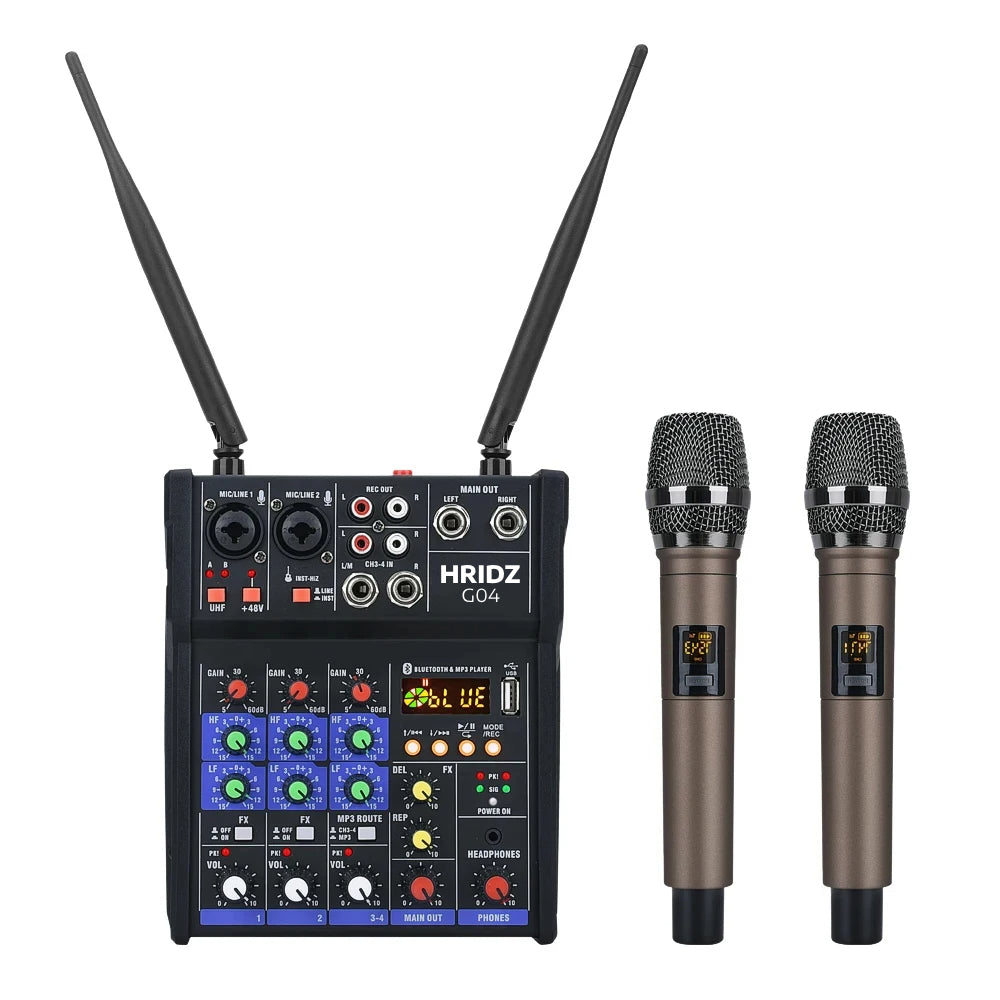


Hridz Karaoke Machine – 4-Channel Audio Mixer with 2 Wireless Mics, Bluetooth & Echo Effects
Condition: Brand New
Delivered in 2-7 days if ordered today*
*Checkout our Shipping Policy for more information.
All orders ships within 1 business day.
The regular shipping delivery times from our Melbourne warehouse are:
- Victoria (VIC): 1-4 business days
- New South Wales (NSW): 2-6 business days
- Queensland (QLD): 3-6 business days
- South Australia (SA): 3-5 business days
- Western Australia (WA): 4-9 business days
- Tasmania (TAS): 4-7 business days
- Northern Territory (NT): 4-9 business days
- Australian Capital Territory (ACT): 3-6 business days
These estimates apply to standard parcel post. If you use Express Post, delivery is usually next business day within Victoria and 1-3 business days to other states.
Couldn't load pickup availability
Pickup available at Dingley - 2nd Point (10 AM to 4 PM, Mon-Fri)
Usually ready in 24 hours
30 Days Return Policy
Your purchase is backed by our 30 days return policy.
Pairs well with
The Hridz Karaoke Machine is a 4-channel Bluetooth audio mixer with 2 UHF wireless microphones and a built-in USB sound card. Plug in a speaker, pair your phone, hand out the mics and start the party, or connect it to a PC with no driver for recording, live streaming and podcasting. It suits karaoke nights, family gatherings, small events and compact DJ setups.
Key Features
- 2 UHF wireless microphones included: built-in receiver, 660-690MHz, 30 selectable channels, up to 50 m (195 ft) range, high-quality dynamic capsule for clear vocals.
- Bluetooth and USB playback: stream backing tracks from your phone, or play MP3, WAV, APE and FLAC files from USB. PC/MP3 mode switch.
- Built-in USB sound card: direct USB connection to a computer, no driver required, for PC recording and streaming. You can also record to a USB drive.
- Echo effects: adjustable Delay and Repeat, with an effect switch on each channel.
- +48V phantom power: independent on each mono channel, for condenser microphones.
- Flexible inputs: 2 mono MIC/LINE channels plus a stereo input (1/4" and RCA), with parametric EQ.
- LCD display and 3.5mm headphone output: easy operation and real-time monitoring.
- USB powered (DC 5V): works with a computer, power adapter or power bank. Compact metal body built to travel.
Great For
- Karaoke parties and family nights
- PC recording, live streaming and podcasting
- Birthday parties, small events and small gigs
- Singing practice at home
Specifications
| Channels | 4 (2 mono MIC/LINE + 1 stereo) |
|---|---|
| Power | USB, DC 5V |
| Frequency response | 20Hz to 20kHz ±0.5dB |
| Signal-to-noise ratio | -80dB |
| Input impedance | Mono 11K, stereo 100K |
| Parametric EQ | HI 12kHz ±15dB, LOW 80Hz ±15dB |
| Wireless microphones | 660-690MHz, 30 channels, up to 50 m, 2 x 1.5V AA each (not included) |
| Size | 156 x 180 x 55 mm (6.1 x 7.0 x 2.1 in) |
What's in the Box
- 1 x Hridz karaoke audio mixer
- 2 x Wireless microphones
- 1 x USB data cable
- 1 x User manual
Batteries are not included. Each wireless microphone takes 2 x AA batteries.
How to Connect the Wireless Mics to the Mixer
The microphones pair with the mixer automatically. You will need 2 x AA batteries for each mic (not included).
- Open the battery compartment on each mic and insert 2 x AA batteries, matching the + and − marks.
- Connect the mixer to power and switch it on.
- Press the UHF button on the mixer (top left corner) to turn it on.
- Press and hold the on/off switch on the mic until it turns on.
- The mic connects to the mixer automatically. The UHF A light (mic A), B light (mic B) or both turn red on the mixer to show which mics are connected.
- Repeat steps 4 and 5 for the second mic, then raise the mic volume on the mixer and speak into the mic to test.
Mic not connecting? Check the batteries are fresh and the right way round, and make sure the UHF button is on and the mixer is powered before you turn the mic on.
Frequently Asked Questions
How do I connect the wireless microphones to the mixer?
Insert 2 x AA batteries in each mic, power on the mixer, turn the UHF button on (top left), then press and hold the mic's on/off switch. The mic pairs automatically, and the UHF A or B light turns red on the mixer when it is connected. See the full steps above.
Can it run without a computer?
Yes. It is USB powered (DC 5V), so you can run it from a power adapter, power bank or computer.
Can I use it for PC recording and streaming?
Yes. It has a built-in USB sound card. Connect it to your computer by USB, no driver needed.
Do the wireless microphones need batteries?
Yes. Each microphone takes 2 x 1.5V AA batteries, which are not included.
Can I record my karaoke sessions?
Yes. Record to a USB drive or a connected PC.
Can the +48V phantom power run speakers?
No. Phantom power is for condenser microphones and other low-power XLR devices. Connect the mixer to active speakers or an amplifier for sound output.
What is the wireless range of the microphones?
Up to 50m (195ft), with 30 selectable channels to avoid interference from other wireless devices.
What warranty does it have?
This Hridz karaoke mixer is backed by a 12-month Hridz warranty against manufacturing defects.
Need Something Different?
For more inputs, see the CT-60S 6-channel or CT-80S 8-channel mixers, or browse all karaoke mixers with wireless microphones.
Questions? Read the full FAQ > or watch the set-up and usage guide >
Fast AU shipping.
Hridz Karaoke Machine – 4-Channel Audio Mixer with 2 Wireless Mics, Bluetooth & Echo Effects
Product details
The Hridz Karaoke Machine is a 4-channel Bluetooth audio mixer with 2 UHF wireless microphones and a built-in USB sound card. Plug in a speaker, pair your phone, hand out the mics and start the party, or connect it to a PC with no driver for recording, live streaming and podcasting. It suits karaoke nights, family gatherings, small events and compact DJ setups.
Key Features
- 2 UHF wireless microphones included: built-in receiver, 660-690MHz, 30 selectable channels, up to 50 m (195 ft) range, high-quality dynamic capsule for clear vocals.
- Bluetooth and USB playback: stream backing tracks from your phone, or play MP3, WAV, APE and FLAC files from USB. PC/MP3 mode switch.
- Built-in USB sound card: direct USB connection to a computer, no driver required, for PC recording and streaming. You can also record to a USB drive.
- Echo effects: adjustable Delay and Repeat, with an effect switch on each channel.
- +48V phantom power: independent on each mono channel, for condenser microphones.
- Flexible inputs: 2 mono MIC/LINE channels plus a stereo input (1/4" and RCA), with parametric EQ.
- LCD display and 3.5mm headphone output: easy operation and real-time monitoring.
- USB powered (DC 5V): works with a computer, power adapter or power bank. Compact metal body built to travel.
Great For
- Karaoke parties and family nights
- PC recording, live streaming and podcasting
- Birthday parties, small events and small gigs
- Singing practice at home
Specifications
| Channels | 4 (2 mono MIC/LINE + 1 stereo) |
|---|---|
| Power | USB, DC 5V |
| Frequency response | 20Hz to 20kHz ±0.5dB |
| Signal-to-noise ratio | -80dB |
| Input impedance | Mono 11K, stereo 100K |
| Parametric EQ | HI 12kHz ±15dB, LOW 80Hz ±15dB |
| Wireless microphones | 660-690MHz, 30 channels, up to 50 m, 2 x 1.5V AA each (not included) |
| Size | 156 x 180 x 55 mm (6.1 x 7.0 x 2.1 in) |
What's in the Box
- 1 x Hridz karaoke audio mixer
- 2 x Wireless microphones
- 1 x USB data cable
- 1 x User manual
Batteries are not included. Each wireless microphone takes 2 x AA batteries.
How to Connect the Wireless Mics to the Mixer
The microphones pair with the mixer automatically. You will need 2 x AA batteries for each mic (not included).
- Open the battery compartment on each mic and insert 2 x AA batteries, matching the + and − marks.
- Connect the mixer to power and switch it on.
- Press the UHF button on the mixer (top left corner) to turn it on.
- Press and hold the on/off switch on the mic until it turns on.
- The mic connects to the mixer automatically. The UHF A light (mic A), B light (mic B) or both turn red on the mixer to show which mics are connected.
- Repeat steps 4 and 5 for the second mic, then raise the mic volume on the mixer and speak into the mic to test.
Mic not connecting? Check the batteries are fresh and the right way round, and make sure the UHF button is on and the mixer is powered before you turn the mic on.
Frequently Asked Questions
How do I connect the wireless microphones to the mixer?
Insert 2 x AA batteries in each mic, power on the mixer, turn the UHF button on (top left), then press and hold the mic's on/off switch. The mic pairs automatically, and the UHF A or B light turns red on the mixer when it is connected. See the full steps above.
Can it run without a computer?
Yes. It is USB powered (DC 5V), so you can run it from a power adapter, power bank or computer.
Can I use it for PC recording and streaming?
Yes. It has a built-in USB sound card. Connect it to your computer by USB, no driver needed.
Do the wireless microphones need batteries?
Yes. Each microphone takes 2 x 1.5V AA batteries, which are not included.
Can I record my karaoke sessions?
Yes. Record to a USB drive or a connected PC.
Can the +48V phantom power run speakers?
No. Phantom power is for condenser microphones and other low-power XLR devices. Connect the mixer to active speakers or an amplifier for sound output.
What is the wireless range of the microphones?
Up to 50m (195ft), with 30 selectable channels to avoid interference from other wireless devices.
What warranty does it have?
This Hridz karaoke mixer is backed by a 12-month Hridz warranty against manufacturing defects.
Need Something Different?
For more inputs, see the CT-60S 6-channel or CT-80S 8-channel mixers, or browse all karaoke mixers with wireless microphones.
Questions? Read the full FAQ > or watch the set-up and usage guide >
Fast AU shipping.
If you have any questions, you are always welcome to contact us. We'll get back to you as soon as possible, within 24 hours on weekdays.
-
Shipping Information
We ship all orders within 1-2 business days. Free Shipping available Australia wide on order over $10. Check our full Shipping Policy here.
-
Customer Support
At Hridz, Customer satisfaction is our number one priority. Any question or concerns about the product? Chat with friendly support team or fill out Contact Us form and trust me, you will receive nothing but satisfactory support you need.
-
FAQ’s
Frequently asked questions are available on the bottom of any Product page and Live Chat section.
-
Contact Us
You have various ways to contact us. Chat with us during business hours or simply fill out Contact Us form and we will reply to you within 24 hours during working days. You can always email us directly at support@hridz.com
Free AU shipping over $10
12 Months Warranty
Shop with confidence
Buy now, pay later available
Designed for Creators, Perfected for You

Achieve Superior Sound Control with Hridz Audio Mixers
Hridz Audio Mixers are expertly crafted to deliver top-notch sound mixing for professionals and enthusiasts alike, making them ideal for live events, recording studios, podcasting, and content creation. With multi-channel inputs for seamless connection of microphones and instruments, real-time mixing capabilities, and advanced sound control features, these mixers ensure clear, balanced audio output.
FAQs
Please read our FAQs page to find out more.
What is the Shipping time?
Order processing and Shipping time
Hridz is available online only. We Ship to Australia wide (Domestic) and internationally!
FREE shipping available on all orders for Australian shipping addresses!
Order processing time (Business Days): 1 day. We process orders Monday-Friday.
Average Shipping Time within Australia (Business Days): 2 to 7 days (Average from Past orders)
Average Shipping Time for outside Australia (Business Days): 7 to 16 days (delivery varies for items shipping to international location)
Checkout full Shipping Policy at Shipping Policy page.
Do you ship Internationally?
Yes, we offer selected products to get shipped outside of Australia. Contact us to know what product you inquiring about and if your country is included.
Do you accept returns?
Yes, We do. Please check out our Refund and Return Policy for more information.
Is there any warranty on the products I purchase?
Yes, All of the products you purchase from us are backed by 1 year warranty. Also checkout our Return and Refund policy for more information.